2015년 6월 18일 목요일

WIZnetInterface for ARMmbed

WIZnetInterface for ARMmbed

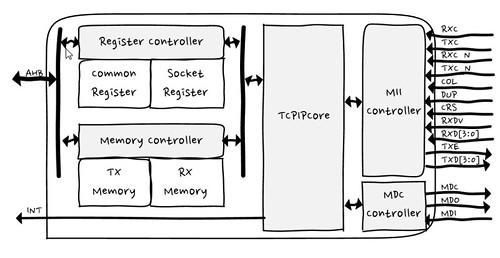
This is WIZnet Ethernet Interface using Hardware TCP/IP chip, W5500 and TCP/IP Offload Engine, W7500.
Users » embeddist » Code » WIZnetInterface
-> WIZnetInterface Lib will be released on Team WIZnet

What is this?

This is an Ethernet Interface library port-based on EthernetInterface. This is where the driver using TCP/IP offload(W5500/W7500), which is a market-proven hardwired TCP/IP stack, is implemented. Therefore, this library does not need lwip-eth.library.

  • The Socket folder contains files that implement the SocketAPI and Protocols as like DHCP and DNS.
  • The arch folder contains files that implement the driver for W5500 and W7500x_TOE.
  • The EthernetInterface.c/.h implement the functions from SocketAPI/EthernetInterface.h
  • The eth_arch.h implement to select TCP/IP TOE depending on platform.

What is new?

  • eth_arch.h
    The eth_arch.h file is added to select arch depending to Target platform, we used define of TARGET_platform.

    #if defined(TARGET_WIZwiki_W7500)
    #include "W7500x_toe.h"
    #define __DEF_USED_IC101AG__  //For using IC+101AG@WIZwiki-W7500
    #else
    #include "W5500.h"            // W5500 Ethernet Shield 
    //#define USE_WIZ550IO_MAC    // WIZ550io; using the MAC address
    #endif
    
  • link()
    The link function is added to check Ethernet link (PHY) up or not.

      * Check if an ethernet link is pressent or not.
      *
      * @returns true if successful
      */
      bool link(int wait_time_ms= 3*1000);
    
  • link_set()
    The set_link function is added to check Ethernet link (PHY) up or not.

     /*
      * Sets the speed and duplex parameters of an ethernet link.
      *
      * @returns true if successful
      */
      void set_link(PHYMode phymode);
    
  • Included DHCP and DNS lib
    DHCP and DNS lib moved in Socket folder.
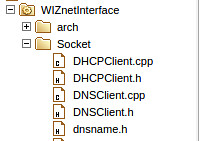
    Included DHCP&DNS

How to import

  • import and update
    • Right Click and click ‘From Import Wizard’ to import WIZnetInterface Library
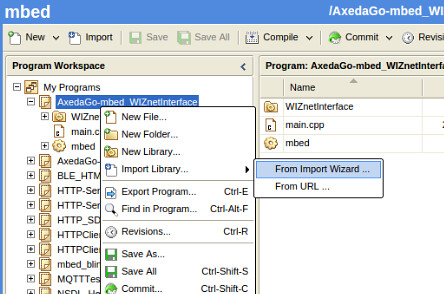
      import library
    • In import Wizard, input ‘WIZnetInterfae” in search box and click ‘Search’ button. Click ‘WIZnetInterface’ in search result window and click ‘Import’ button.
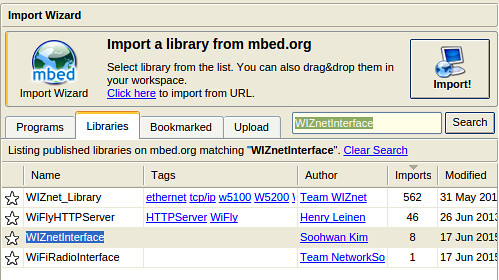
      Search WIZnetInterface
    • Set ‘Import name’ and ‘Target path’, check ‘update’
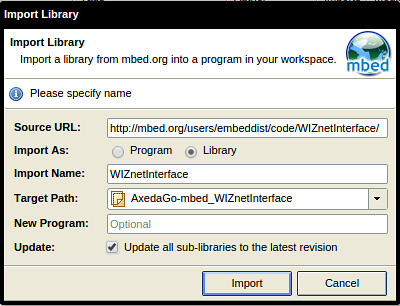
      import and update WIZnetInterface

Where is Clone repository

hg clone https://embeddist@developer.mbed.org/users/embeddist/code/WIZnetInterface/

How to use

  • make main.cpp

    • WIZwiki_W7500

      #define _DHCP_
      EthernetInterface eth;  /*1. Creat eth object from EthernetInteface class*/
      
      main()
      {
        uint8_t mac_addr[6] = {0x00, 0x08, 0xDC, 0x01, 0x02, 0x03};  
      
        /*2. Set MAC, IP, Gatway address and Subnet Mask*/
      #ifdef _DHCP_
        /*2.1 Set  MAC address, Initialize the interface with DHCP*/
        eth.init(mac_addr); 
      #else   
        /*2.2 Set  MAC address and Set MAC, IP, Gatway address and Subnet Mask with string type */
        eth.init(mac_addr, "192.168.77.34", "255.255.255.0", "192.168.77.1"); //Use fixed IP address 
      #endif
      
        /*3. Check Ethernet Link-Done */
        printf("Check Ethernet Link\r\n");
        if(eth.link() == true) { printf("- Ethernet PHY Link-Done \r\n"); }
        else {printf("- Ethernet PHY Link- Fail\r\n");}
      
        /*4. Set IP addresses ,start DHCP if needed  */
        eth.connect();
        printf("Connected, IP: %s\n\r", eth.getIPAddress());
        printf("MASK: %s\n\r", eth.getNetworkMask());
        printf("GW: %s\n\r",eth.getGateway());
        ...
      
        /* Your application 
           Visit for examples - https://developer.mbed.org/teams/WIZnet/
        */
      
      }
      
    • W5500 Ethernet Shield

      #define _DHCP_
      /* 0. Set SPI Interface with SPI API*/
      SPI spi(D11, D12, D13);                  // mosi, miso, sclk
      /*1. Creat eth object from EthernetInteface class*/
      EthernetInterface eth(&spi, D10, D9);    // spi, cs, reset
      
      main()
      {
        uint8_t mac_addr[6] = {0x00, 0x08, 0xDC, 0x1D, 0x62, 0x11}; 
        /*2. Set MAC, IP, Gatway address and Subnet Mask*/
      #ifdef _DHCP_
        /*2.1 Set  MAC address, Initialize the interface with DHCP*/
        eth.init(mac_addr); 
      #else
        /*2.2 Set  MAC address and Set MAC, IP, Gatway address and Subnet Mask with string type */
        eth.init(mac_addr, "192.168.77.34", "255.255.255.0", "192.168.77.1"); //Use fixed IP address 
      #endif
      
        /*3. Check Ethernet Link-Done */
        printf("Check Ethernet Link\r\n");
        if(eth.link() == true) { printf("- Ethernet PHY Link-Done \r\n"); }
        else {printf("- Ethernet PHY Link- Fail\r\n");}
      
        /*4. Set IP addresses ,start DHCP if needed  */
        eth.connect();
        printf("Connected, IP: %s\n\r", eth.getIPAddress());
        printf("MASK: %s\n\r", eth.getNetworkMask());
        printf("GW: %s\n\r",eth.getGateway());
        ...
      
        /* Your application 
           Visit for examples - https://developer.mbed.org/teams/WIZnet/
        */
      
      }
      

WIZnetInterface Implementations for mbed Ethenret Interface

For networking based on Ethernet network, Ethenret Interface library is provided and is composed TCP/IP Protocol layer, Ethernet, EthernetInterface and Socket. In other words, the EthernetInterface library includes the networking stack necessary for connect betwwen mbed platform and Internet.

Each layer in EthernetInterface provides APIs to connect to the internet.

WIZnetInterface Implementation base on mbed Ethernet Interface

  • EthernetInterface- EthernetInterface Class

    Type Func. Descriptions WIZnetInterface Support
    static int init () Initialize the interface with DHCP. O
    static int init (const char ip, const char mask, const char *gateway) Initialize the interface with a static IP address. O
    static int connect (unsigned int timeout_ms=15000) Connect Bring the interface up, start DHCP if needed. O
    static int disconnect () Disconnect Bring the interface down. X
    static char* getMACAddress () Get the MAC address of your Ethernet interface. O
    static char* getIPAddress () Get the IP address of your Ethernet interface. O
    static char* getGateway () Get the Gateway address of your Ethernet interface. O
    static char* getNetworkMask () Get the Network mask of your Ethernet interface. O
    void EthernetInterface (PinName mosi, PinName miso, PinName sclk, PinName cs, PinName reset) Initialize SPI SPI pins to user for SPI interface and Reset pin for W5500 0 (for W5500)
    void EthernetInterface (SPI* spi, PinName cs, PinName reset) Initialize SPI SPI pins to user for SPI interface and Reset pin for W5500 O (for W5500)
  • Socket - TCPSocketServer Class

    Type Func. Descriptions WIZnetInterface Support
    TCPSocketServer () Instantiate a TCP Server. O
    int bind (int port) Bind a socket to a specific port. O
    int listen (int backlog=1) Start listening for incoming connections. O
    int accept ( TCPSocketConnection &connection) Accept a new connection. O
    void set_blocking (bool blocking, unsigned int timeout=1500) Set blocking or non-blocking mode of the socket and a timeout on blocking socket operations. O
    int set_option (int level, int optname, const void *optval, socklen_t optlen) Set socket options. X
    int get_option (int level, int optname, void optval, socklen_t optlen) Get socket options. X
    int close (bool shutdown=true) Get socket options. O
  • Socket - TCPSocketConnection Class

    Type Func. Descriptions WIZnetInterface Support
    TCPSocketConnection () TCP socket connection. O
    int connect (const char *host, const int port) Connects this TCP socket to the server. O
    bool is_connected (void) Check if the socket is connected. O
    int send (char *data, int length) Send data to the remote host. O
    int send_all (char *data, int length) Send all the data to the remote host. O
    int receive (char *data, int length) Receive data from the remote host. O
    int receive_all (char *data, int length) Receive all the data from the remote host. O
    void set_blocking (bool blocking, unsigned int timeout=1500) Set blocking or non-blocking mode of the socket and a timeout on blocking socket operations. O
    int set_option (int level, int optname, const void *optval, socklen_t optlen) Set socket options. X
    int get_option (int level, int optname, void optval, socklen_t optlen) Get socket options. X
    int close (bool shutdown=true) Close the socket. O
    void reset_address (void) Reset the address of this endpoint. O
    int set_address (const char *host, const int port) Set the address of this endpoint. O
    char* get_address (void) Get the IP address of this endpoint. O
    int get_port (void) Get the port of this endpoint. O
  • etnerhet_api - ethernet_api Class

    Type Func. Descriptions WIZnetInterface Support
    Ethernet () Initialise the ethernet interface. X
    virtual ~Ethernet () Powers the hardware down. X
    int write (const char *data, int size) Writes into an outgoing ethernet packet. X
    int send () Send an outgoing ethernet packet. X
    int receive () Recevies an arrived ethernet packet. X
    int read (const char *data, int size) Read from an recevied ethernet packet. X
    void address (char *mac) Gives the ethernet address of the mbed. X
    int link() Returns if an ethernet link is pressent or not. O
    void set_link(Mode mode) Sets the speed and duplex parameters of an ethernet link. O

Revision History

  • Initial Release : 19 June. 2015
2015년 6월 8일 월요일

[scrap] RKi6000 Wi-Fi for IoT, Lowest power in the world


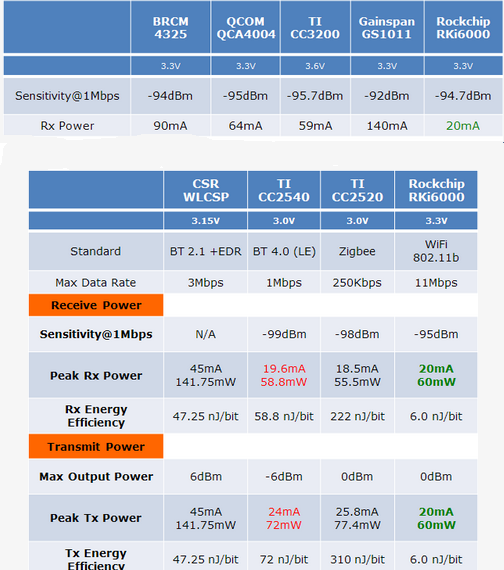
  • Rockchip annouces the lowet power Wi-Fi, RKI6000, for IoT. 

 Rockchip RKi6000 is claimed to be the lowest power Wi-Fi in the world, similar to that of Bluetooth 4.0 LE, it is designed for IoT applications, for Smart Homes, for smart lights, doors, kitchens, wearables, consumer electronics, home appliances, home safety, automation systems, automobiles and medical equipment, etc. Rockchip says that it can run for 35 years on AAA Batteries (when set to only ping data only once every several minutes) The RKi6000 uses Rockchip's new ultra-low power Wi-Fi and memory technology to reduce power consumption of IoT (Internet of Things) smart devices by 85%, with power consumption equal to that of Bluetooth 4.0 LE (Low Energy), with receiving power consumption around 20mAh during use, 85% lower than standard Wi-Fi built with RF architecture. When compared with the Bluetooth/ZIGBEE standard, Rockchip says that Wi-Fi is more convenient to use for IoT with the easy Internet connection provided by the standard Wi-Fi infrastructure, but because of its high power requirements, Wi-Fi was previously unable to be incorporated into portable devices with an electrical current limit.
  • Power consumption
http://www.cnx-software.com/2015/06/03/rockchip-rki6000-wifi-soc-promises-bluetooth-4-0-power-consumption-levels/

* YouTube materials


2015년 6월 5일 금요일

List of Arduino Ethernet Shield clone with W5500

2015년 6월 4일 목요일

mbed RPC with W5500 Ethernet Shield

This post shows how to use mbed RPC with W5500 Ethernet Shield and how to port an Ethernet application used lwIP to W5500Interface.

Remote Procedure Call

>In computer science, a remote procedure call (RPC) is an inter-process communication that allows a computer program to cause a subroutine or procedure to execute in another address space (commonly on another computer on a shared network) without the programmer explicitly coding the details for this remote interaction.
http://en.wikipedia.org/wiki/Remote_procedure_call

RPC
*source - http://uw714doc.sco.com/en/SDK_netapi/rpcpD.how_RPC_works.html

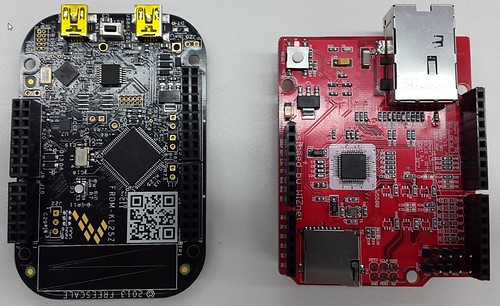
HW - FRDM-KL25Z + W5500 Ethernet Shield

FRDM-KL25Z + W5500 Ethernet Shield

SW - mbed RPC

Server that executes remote procedure call (RPC) commands through HTTP.
mbed RPC @developer.mbed.org/handbook
In RPC libaray, a simple HTTP Server can execute RPC commands sent from HTTP Client.
This library uses EthernetInterface (lwIP) and mbedOS.

RPC command

The RPC command is encoded in this way :

  • container that wraps a skeleton’s ID
  • method that will be invoked
  • parameters that will be inputted (optional)

    • Command examples
      PUT command : “/DigitalOut/new?arg=LED2&name=led2”
      GET command : “/led2/write?arg=1”

Request handlers

To process requests, the server relies on RequestHandler. Each RequestHandler is assigned to a request type. Each type of request is assigned to a certain role :

  • PUT requests to create new objects
  • DELETE requests to delete objects
  • GET requests to call a function of an object

Porting EthernetInterface to W5500Interface

Here is a guide how to modify :

  • Folk HTTP-Server in you program workspace
  • Delete 2 Folders; EthernetInterface(lwIP) & mbed-rtos in HTTP-Server
  • Added array for MAC Address which was written at Source Hardware Address Register in W5500.

      uint8_t mac_addr[6] = {0x00, 0x08, 0xDC, 0x00, 0x01, 0x02};`
    
  • Change EthernetInterface() and set SPI Interface for W5500

          /*  Use EthernetInterface
           *EthernetInterface eth;
           *if(eth.init())
           *int ret = eth.init("192.168.77.34", "255.255.255.0", "192.168.77.1");    
           */
          /* ----- Use W5500 Ethernet Shied -----*/
          SPI spi(D11, D12, D13);      /* mosi, miso, sclk */
          //spi.frequency(12500000); /* Optional : set proper SPI clock */
          EthernetInterface eth(&spi, D10, D9); /* spi, cs, reset(dummy) */
          ...
          /* ----- Use W5500 Ethernet Shied -----*/
    
  • Set Network configuration: I will use fixed Address.

         /*  in case of using W5500 Ethenret Shield */
         int ret = eth.init(mac_addr, "192.168.77.34", "255.255.255.0", "192.168.77.1");    
         /* in case of using W550io (has a unique real MAC address) */
         //int ret = eth.init("192.168.77.34", "255.255.255.0", "192.168.77.1");
    

Repository : Users » embeddist » Code » HTTP-Server_W5500Interface

http://developer.mbed.org/users/embeddist/code/HTTP-Server_W5500Interface/

Demo - Using a browser for HTTP Client

Here is a quick guide how to run this program :

  • Compiles this program and copies it to the mbed
  • Open TeraTerm (install it if you don’t have it), select serial and choose the port named “mbed Serial Port”
  • Reset your mbed
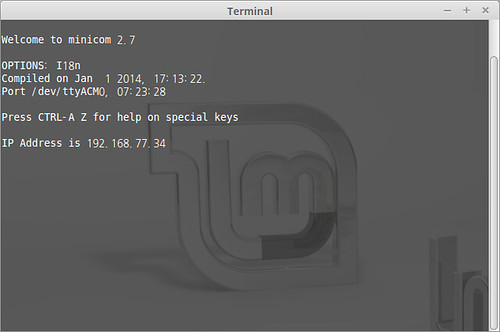
  • The IP address should appear in teraterm. In this example, I will use 192.168.77.34
    Terminal
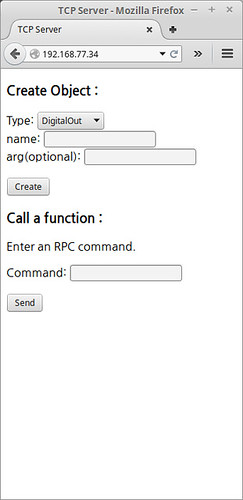
  • Open your browser and go to http://192.168.77.34
    connecttingl
  • If everything is ok, you should see a webpage.

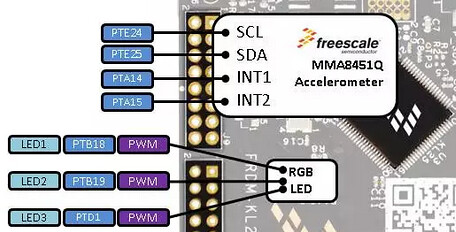
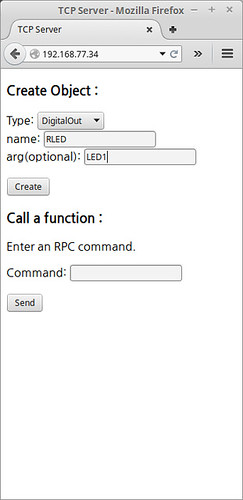
  • Create Red LED as arg=LED1 and name=RLED
    RGB LED
    Create Red LED

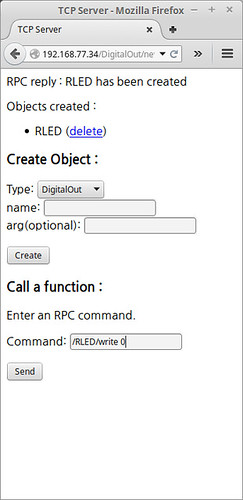
  • To procedure, send command: RLED/write 0
    Reset Red LED

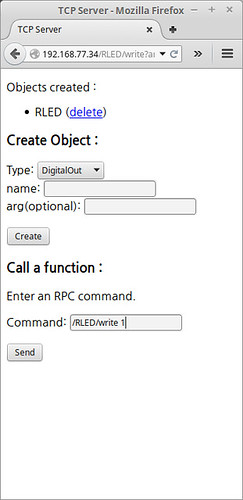
  • To procedure, send command: RLED/write 1
    Reset Red LED

List of Arduino Ethernet and clones

2015년 5월 31일 일요일

Network performance of SoC with TCP/IP Offload engine, W7500, for Internet of Things

test.html

Network performance of SoC with TCP/IP Offload engine, W7500, for Internet of Things

We have measured TCP throughput of W7500 depending on RX buffer size, Main bus clock and DMA and
used HW, SW and Toos as belows,

What is SoC with TCP/IP TOE, W7500

Iperf for W7500
The 7500 chip is the one-chip solution which integrates an ARM Cortex-M0, 128KB Flash and hardwired TCP/IP TOE which is a market-proven hardwired TCP/IP stack with an integrated Ethernet. Using TOE allows users to implement the Ethernet application by adding the simple socket program. It’s faster and easier than using any other Embedded Ethernet solutions, especially internet of things. In addition, TOE can provide high and stable network performance on target system.
Iperf for W7500
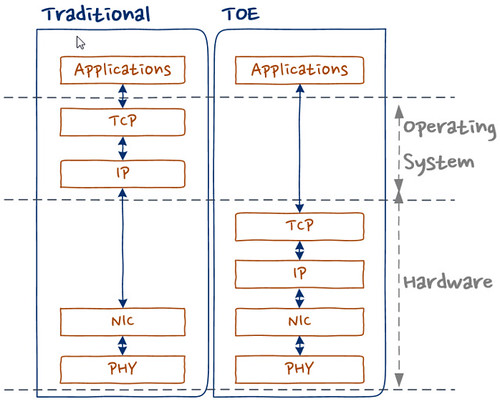
Traditional system could be used operation system for TCP/IP stack. It means more memory and calcurate resources in IoT system which is limited resources extremely. TOE allows to offload the processing of TCP/IP protocols from the host microcontroller,
In TCP/IP protocol stack of W7500, there are multiple protocols as like,
  • Supports Hardwired TCP/IP Protocols : TCP, UDP, ICMP, IPv4, ARP, IGMP, PPPoE
  • Supports 8 independent sockets simultaneously
  • Supports Power down mode
  • Supports Wake on LAN over UDP

Hardware

  • W7500, SoC with TOE, for IOT
    wizwiki_W7500
    • ARM Cortex-M0
      • 48MHz maximum frequency
    • Hardwired TCP/IP Core
      • 8 Sockets
      • SRAM for socket: 32 KB
    • Memories
      • Flash: 128 KB
        • Large flexible-size SRAM buffer for various User Application
        • ROM for boot code: 6 KB
    • ADC : 12bit, 8ch, 1Msps
    • 6-channel DMA
    • GPIOs
    • Timer/PWM : 1 Watchdog , 4 Timers, 8 PWMs
    • Communication Interfaces: 3 UARTs, 2 SPIs, 2 I2Cs
    • Crypto : 1 RNG (Random Number Generator)
    • Package : 64 TQFP (7x7 mm)
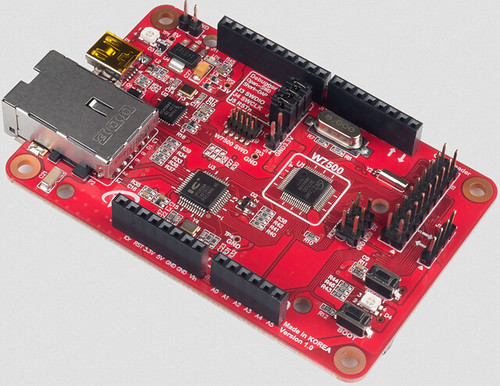
  • WIZwiki_W7500
    wizwiki_W7500
    • WIZnet W7500
    • 32-bit ARM Cortex-M0
    • 128KB Flash / 48 SRAM
    • Hardware TCP/IP coe (WIZnet TCP/IP Engine)
    • CMSIS-DAP
    • SWD Con.
    • WIZwiki-W7500 feature
    • Arduino Pin compatible
    • ISP / SD Slot / REG LED
    • Ethernet PHY

Software: TCP recv only

  • How to config. Clock
    • W7500RM - 10.4.3 PLL frequency calculating register (PLL_FCR)
      • Address:0x4100_1014
      • Reset value : 0x0005_0200=> 20MHz
        bits 31-22 21-16 15-14 13-8 7-2 1-0
        Desc. RSVD M RSVD N RSVD OD
        These bits are written by S/W to set frequency of PLL output.
        PLL output frequency FOUT is calculated by the following equations:
        FOUT = FIN x M / N x 1 / OD
        Where:
        M = M[5] x 32 + M[4] x 16 + M[3] x 8 + M[2] x 4 + M[1] x 2 + M[0] x 1 (2 ~ 63)
        N = N[5] x 32 + N[4] x 16 + N[3] x 8 + N[2] x 4 + N[1] x 2 + N[0] x 1 (1 ~ 63)
        OD = 2 (2 x OD[1]) x 2 (1 x OD[0])
    • Psedo-code for PLL_FCR
      // main.c 
      /* External Clock */
      CRG_PLL_InputFrequencySelect(CRG_OCLK);
      //*(volatile uint32_t *)(0x41001014) = 0x000C0200; // 48MHz
      //*(volatile uint32_t *)(0x41001014) = 0x000B0200; // 44MHz
      //*(volatile uint32_t *)(0x41001014) = 0x000A0200; // 40MHz
      //*(volatile uint32_t *)(0x41001014) = 0x00090200; // 36MHz
      //*(volatile uint32_t *)(0x41001014) = 0x00080200; // 32MHz
      //*(volatile uint32_t *)(0x41001014) = 0x00070200; // 28MHz
      //*(volatile uint32_t *)(0x41001014) = 0x00060200; // 24MHzS
      //*(volatile uint32_t *)(0x41001014) = 0x00050200; // 20MHz, Default
      //*(volatile uint32_t *)(0x41001014) = 0x00040200; // 16MHz
      //*(volatile uint32_t *)(0x41001014) = 0x00030200; // 12MHz
      *(volatile uint32_t *)(0x41001014) = 0x00020200; //  8MHz
      
  • How to config. RX memory buffer
    • Iperf test Firmware
      • Source Code : https://github.com/embeddist/W7500/tree/W7500_DMA
      • W7500/W7500x_Library_Examples/Projects/Peripheral_Examples/WZTOE/IperfTest_DMA/main.c
      • TCP only Recv function in iperf.c
        int32_t recvonly_tcps(uint8_t sn, uint8_t* buf, uint16_t port)
        {
             int32_t ret;
             uint16_t size = 0;
             int32_t i;
             switch(getSn_SR(sn))
             {
                case SOCK_ESTABLISHED :
                   if(getSn_IR(sn) & Sn_IR_CON)
                   {
                      setSn_IR(sn,Sn_IR_CON);
                   }
                   // Don't need to check SOCKERR_BUSY because it doesn't not occur.
                   if((size = getSn_RX_RSR(sn)) > 0) 
                   {
                      if(size > DATA_BUF_SIZE) size = DATA_BUF_SIZE;
                      printf("---------------size :%d\r\n", size);
                     ret = recv(sn, buf, size);                 
                   }
                   break;
                case SOCK_CLOSE_WAIT :
                   if( (ret = listen(sn)) != SOCK_OK) return ret;
                   break;
                case SOCK_CLOSED:
                   if((ret = socket(sn, Sn_MR_TCP, port, Sn_MR_ND)) != sn) return ret;
                   break;
                default:
                   break;
             }
             return 1;
        }
        
    • Sn_RXBUF_SIZE (Socket n RX Buffer Size Register)
        Sn_RXBUF_SIZE configures the RX Buffer size of Socket n. Socket n RX Buffer size can be configured with 1,2,4,8, and 16 Kbytes. If a different size is configured, the data cannot be normally received from a peer.
      
      Value (dec) 0 1 2 4 8 16
      Buffer size 0KB 1KB 2KB 4KB 8KB 16KB
    • Use wizchip_init() for Setting Sn_RXBUF_SIZE
        // main.c 
        /* set Sn_RXBUF_SIZE and Sn_RXBUF_SIZE as 8KB */
        uint8_t tx_size[8] = { 8, 0, 0, 0, 0, 0, 0, 0 };
        uint8_t rx_size[8] = { 8, 0, 0, 0, 0, 0, 0, 0 };
      
        ...
      
        /* Set Network Configuration */
        wizchip_init(tx_size, rx_size);
      
    • Use API for Setting Sn_RXBUF_SIZE
        uint8 socket_num = 0;
        uint8 rx_buffer_size = 4; // set 4KB
        setSn_RXBUF_SIZE(socket_num, rx_buffer_size);
      
  • How to use Direct Memory Access (DMA)
    Direct memory access (DMA) is used in order to provide high-speed data transfer between peripherals and memory as well as memory to memory. The DMA controller has up to 6 channels in total, each dedicated to managing memory access requests from one or more peripherals. For more details, refer to “PrimeCell® μDMA Controller (PL230)” from the Technical Reference Manual.
    • WZ_TOE-to-memory transfer (software request only)
    • Initialization by using API
        //main.c
        /* Init. uDMA */
        dma_data_struct_init();
        dma_init();
      
    • DMA memory copy in W7500x_dma.c
        /* DMA memory copy */
        uint32_t chnl_num  = 5 ;          //DMA Channel number
        unsigned int src = 0xXXXX_XXXX;   // Source Address
        unsigned int dest = 0xDDDD_DDDD ; // Destination Address
        unsigned int size = 0;            // byte operation
        unsigned int num = 1024;          // data length
        void dma_memory_copy (chnl_num, src, dest, size, num)
      
    • Read/Write DMA functions for WZ_TOE
        //W7500x_wztoe.c
        #define _DEF_ACCESS_DMA_BUF_
        #ifdef _DEF_ACCESS_DMA_BUF_
        #include "W7500x_dma.h"
        #define MAX_TRANSNUM  1024
        void WIZCHIP_READ_DMA (uint32_t BaseAddr, uint16_t ptr, uint8_t* pBuf, uint16_t len)
        {
            /* call void dma_memory_copy () */
        }
        void WIZCHIP_WRITE_DMA(uint32_t BaseAddr, uint16_t ptr, uint8_t* pBuf, uint16_t len)
        {
            /* call void dma_memory_copy () */
        }
        ...
      

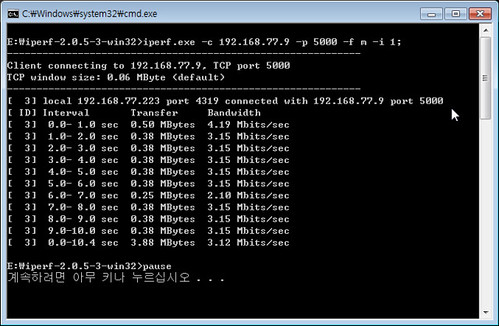
How to use Bandwidth Measurement Tool: Iperf

Iperf is a tool to measure maximum TCP bandwidth, allowing the tuning of various parameters and UDP characteristics. Iperf reports bandwidth, delay jitter, datagram loss.
  • https://iperf.fr/
    # ex.) host IP(192.168.77.9):port[5000], display format is Mbit/sec, interval 1 sec.
    >iperf.exe -c 192.168.77.9 -p 5000 -f m -i 1
    
    • -c : —client host, -c will connect to the host specified.
    • -p : —port #, the server port for the server to listen.
    • -f : —format [], ‘m’ = Mbit/sec
    • -i : —interval #, Sets the interval time in seconds between periodic bandwidth through performance
  • Serial terminal for wizwiki_W7500 monitoring
    PHY is linked. 
    MAC ADDRESS : 00:08:DC:01:02:03
    IP ADDRESS : 192.168.077.009
    GW ADDRESS : 192.168.077.001
    SN MASK: 255.255.255.000
    TEST- START 
    0:Listen, TCP server loopback, port [5000]
    0:Connected - 192.168.77.223 : 1110 // <-- dispaly after TCP_Established from Iperf
    
  • Excute Iperp on Command Prompt
    Iperf for W7500

Network performances

Analysis of this improvement shows
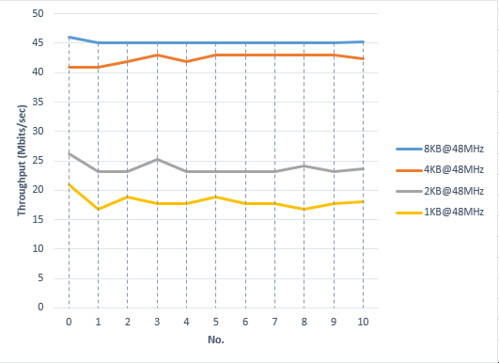
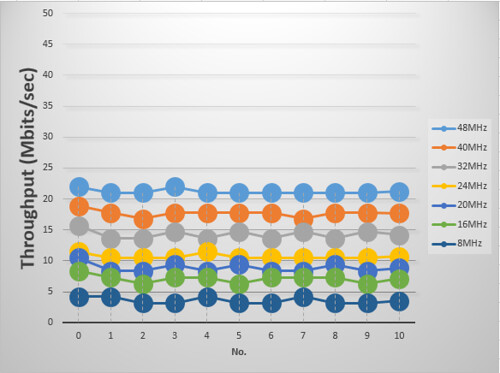
  • that the total improvement is due to increasing RX buffer.
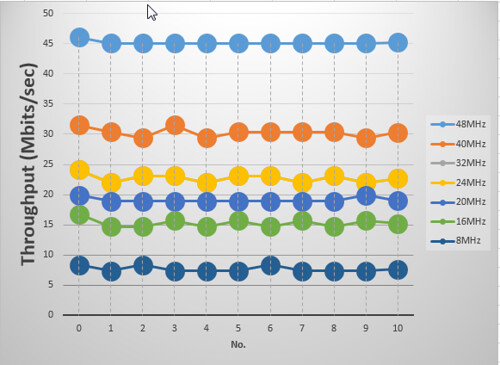
  • that the total improvement is due to increasing AHB bus Clock.
  • that 200% of the total improvement is due to using DMA.

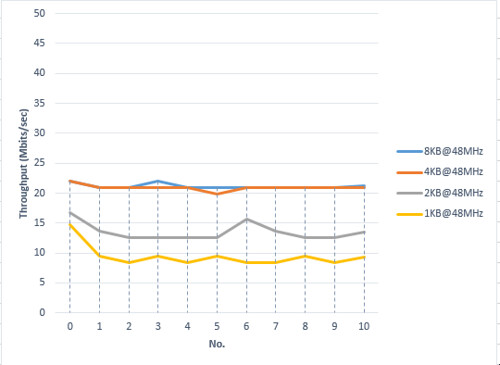
Network performance according to RX Buffer size

  • Fig. TOE performance according to RX buffer size ( w/o DMA@48MHz)
    TOE performance according to RX buffer size
  • Fig. TOE performance according to to RX buffer size (w/ DMA@20MHz)
    TOE performance according to to RX buffer siz

Network performancd according to AHB bus clock

  • Fig. TOE performance according to AHB bus clock (w/o DMA, RX Buffer:8KB)
    TOE performance according to AHB bus clock
  • Fig. TOE performance according to AHB bus clock (w/o DMA, RX Buffer:8KB)
    TOE performance according to AHB bus clock

2015년 5월 29일 금요일

WIZ Ethernet Library for Arduino IDE-1.6.4

ARM mbed
Download Arduino IDE-1.6.4

WIZ Ethernet Library for Arduino IDE-1.6.4

The Ethernet library lets you connect to the Internet or a local network.

  • Supported devices
    W5500 : ioShield, WIZ550io, W5500 Ethernet Shield, Arduino Ethernet Shield 2
    W5200 : W5200 Ethernet Shield, WIZ820io
    W5100 : Arduino Ethernet Shield
  • Software

    • Install WIZ Ethernet library IDE-1.6.4

      • Download all files
      • Overwrite “Ethernet” folder onto the “Arduino\libraries\Ethernet” folder in Arduino sketch.
    • Select device(shield)

      • Uncomment device(shiel) you want to use in $/Ethernet/src/utility/w5100.h

        //#define W5100_ETHERNET_SHIELD // Arduino Ethenret Shield and Compatibles ...
        //#define W5200_ETHERNET_SHIELD // WIZ820io, W5200 Ethernet Shield 
        #define W5500_ETHERNET_SHIELD   // WIZ550io, ioShield series of WIZnet
        
      • If WIZ550io used, uncommnet “#define WIZ550io_WITH_MACAADDRESS” in $/Ethernet/src/utility/w5100.h

        #if defined(W5500_ETHERNET_SHIELD)
        //#define WIZ550io_WITH_MACADDRESS // Use assigned MAC address of WIZ550io
        #include "w5500.h"
        #endif
        
    • Using the WIZ Ethernet library and evaluate existing Ethernet example.
      All other steps are the same as the steps from the Arduino Ethernet Shield. You can use examples in ./Ethernet/examples folder for the Arduino IDE 1.6.4, go to Files->Examples->Ethernet, open any example, then copy it to your sketch file and change configuration values properly.
      After that, you can check if it is work well. For example, if you choose ‘WebServer’, you should change IP Address first and compile and download it. Then you can access web server page through your web browser of your PC or something.

What is new ?

  • Added new functions

    • sockStatus(SOCKET s) = readSnSR(SOCKET s)

      uint8_t socketStatus(SOCKET s)
      {
          SPI.beginTransaction(SPI_ETHERNET_SETTINGS);
          uint8_t status = W5100.readSnSR(s);
          SPI.endTransaction();
          return status;
      }
      
    • reavAvalable(SOCKET s) = getRxReceiveSize(SOCKET s)

      int16_t recvAvailable(SOCKET s)
      {
          SPI.beginTransaction(SPI_ETHERNET_SETTINGS);
          int16_t ret = W5100.getRXReceivedSize(s);
          SPI.endTransaction();
          return ret;
      }
      
  • Added SPI Transaction APIs
    To solve conflicts that sometimes occur between multiple SPI devices when using SPI from interrupts and/or different SPI settings, SPI Transcation APIs use between between read and write SPI functions.

      SPI.beginTransaction(SPI_ETHERNET_SETTINGS);
      W5100.setIPAddress(_dhcp->getLocalIp().raw_address());
      W5100.setGatewayIp(_dhcp->getGatewayIp().raw_address());
      W5100.setSubnetMask(_dhcp->getSubnetMask().raw_address());
      SPI.endTransaction();
    
  • Removed Twitter.cpp / Twitter.h

Code on Github

evision History

  • Initial Release : 21 May. 2015