DNS Web Client
자세한 사항은 아래의 링크와 그림을 참고 한다.
DNS
DNS-wikipedia
*참고:http://www.routercheck.com/wp-content/uploads/2014/03/dns-and-ipv6-470x282.jpgHTTP
HTTP-wikipedia
*참고:http://codegangsta.gitbooks.io/building-web-apps-with-go/content/http_basics/http_diagram.png


Do DnsWebClient
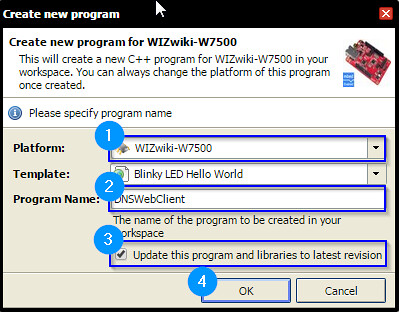
- Create New Program as DNS Web Client
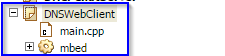
- Confirm the created program
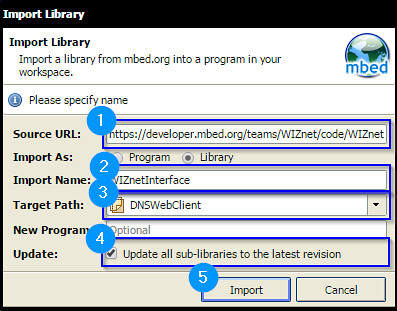
- Import WIZnetInterface by using Import Wizard:”https://developer.mbed.org/teams/WIZnet/code/WIZnetInterface/"(1)
Make Codes
- Set DHCPclient, Sourtce port and Domain name server
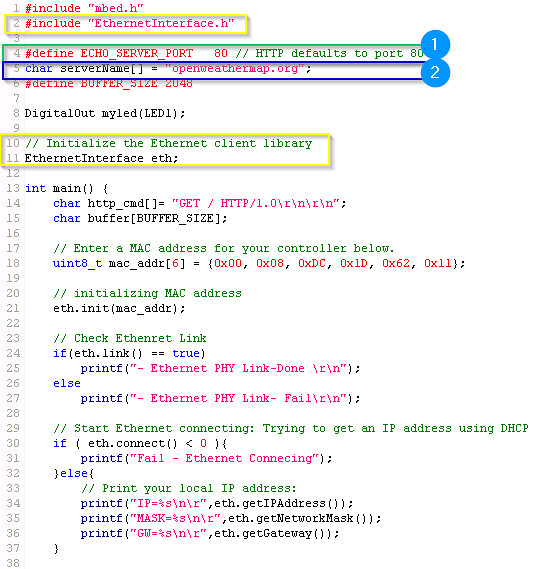
- TCP-connection, TCP-recv and Display received data
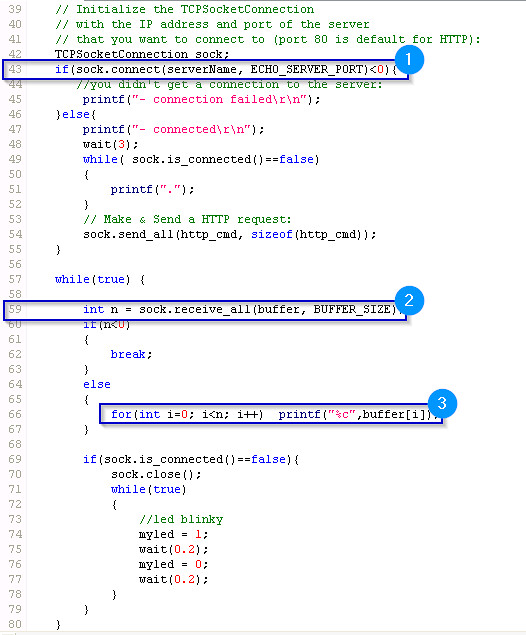
- Set DHCPclient, Sourtce port and Domain name server
Confirm packets bye WireShark
5.1 DHCP complite
5.2 DNS handshake between Clinet and DNS server
5.3 TCP-Connection between Clinet and HTTP server
5.4 Request HTTP GET
5.5 RECV TCP DATA: HTTP page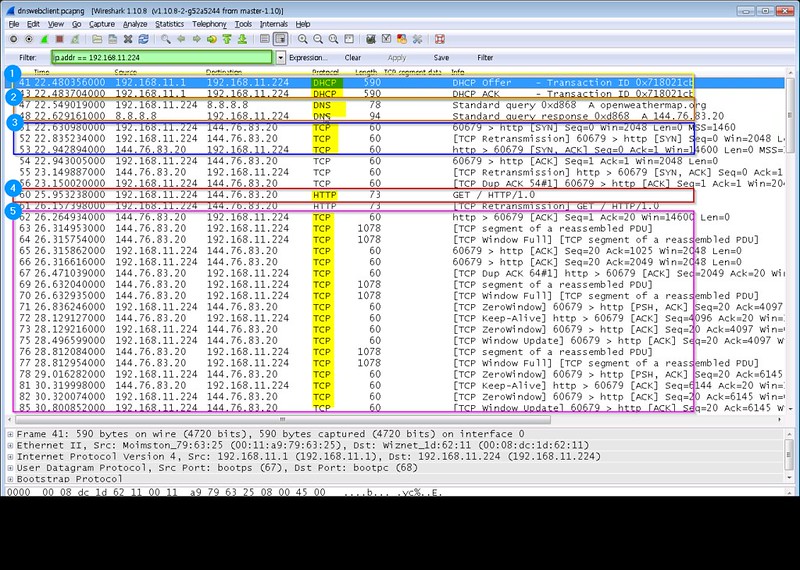
DNS packet
- 5.1 DNS Request
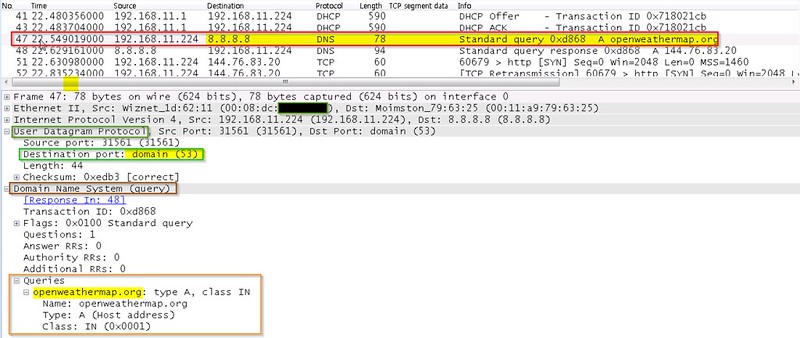
- 5.2 DNS Reponse
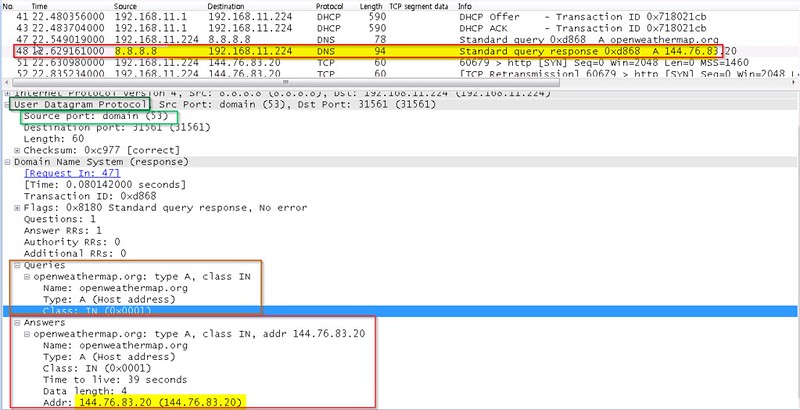
- 5.1 DNS Request
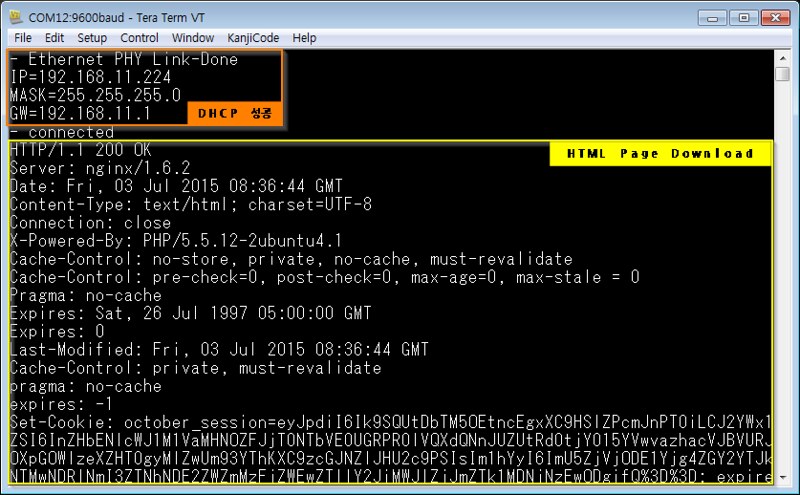
Confirm Serial Teminal
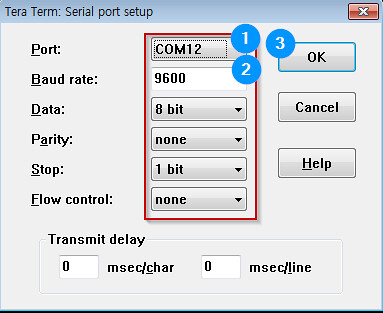
- Set Serial teminal
- Display
- Set Serial teminal
Code Repository
https://developer.mbed.org/users/embeddist/code/DNSWebClient/
Ref. Code
#include "mbed.h"
#include "EthernetInterface.h"

#define ECHO_SERVER_PORT   23 // telnet defaults to port 23

DigitalOut myled(LED1);

// Initialize the Ethernet client library
EthernetInterface eth;

int main() {
    // Enter a MAC address for your controller below.
    uint8_t mac_addr[6] = {0x00, 0x08, 0xDC, 0x00, 0x01, 0x02};

    // initializing MAC address
    eth.init(mac_addr);

    // Check Ethenret Link
    if(eth.link() == true)
        printf("- Ethernet PHY Link-Done \r\n");
    else
        printf("- Ethernet PHY Link- Fail\r\n");

    // Start Ethernet connecting: Trying to get an IP address using DHCP
    if ( eth.connect() < 0 )
        printf("Fail - Ethernet Connecing");
    else
    {
        // Print your local IP address:
        printf("IP=%s\n\r",eth.getIPAddress());
        printf("MASK=%s\n\r",eth.getNetworkMask());
        printf("GW=%s\n\r",eth.getGateway());
    }

    TCPSocketServer server;
    server.bind(ECHO_SERVER_PORT);
    server.listen();

    while (true) {
        printf("\nWait for new connection...\n\r");
        TCPSocketConnection client;
        server.accept(client);
        //client.set_blocking(false, 1500); // Timeout after (1.5)s

        printf("Connection from: %s\n\r", client.get_address());
        char buffer[256];
        while (true) {
            int n = client.receive(buffer, sizeof(buffer));
            if (n <= 0) break;

            // print received message to terminal
            buffer[n] = '\0';
            printf("Received message from Client :'%s'\n\r",buffer);

            // reverse the message
            char temp;
            for(int f = 0, l = n-1; f<l; f++,l--){
                temp = buffer[f];
                buffer[f] = buffer[l];
                buffer[l] = temp;
                }

            // print reversed message to terminal
            printf("Sending message to Client: '%s'\n\r",buffer);

            // Echo received message back to client
            client.send_all(buffer, n);
            if (n <= 0) break;
        }

        client.close();

        //led blinky
        myled = 1;
        wait(0.2);
        myled = 0;
        wait(0.2);
    }
}
